Setup & Guide
Home
Install firmware, connect Wi-Fi, then wake your PC remotely.
Chrome or Edge required (desktop only).
Quick setup
• Install the firmware on any ESP32 device (ESP32, S2, S3, C2, C3, C5, C6).
• Connect the ESP32 to your Wi-Fi
• Copy the ESP32 MAC from the “Visit Device” page
• Restart the ESP32 to complete setup.
• On the Home page, enter the ESP32 MAC and PC’s MAC, then press Wake.
• Connect the ESP32 to your Wi-Fi
• Copy the ESP32 MAC from the “Visit Device” page
• Restart the ESP32 to complete setup.
• On the Home page, enter the ESP32 MAC and PC’s MAC, then press Wake.
Video Guide
Watch this short video for a full setup walkthrough:
Remote access
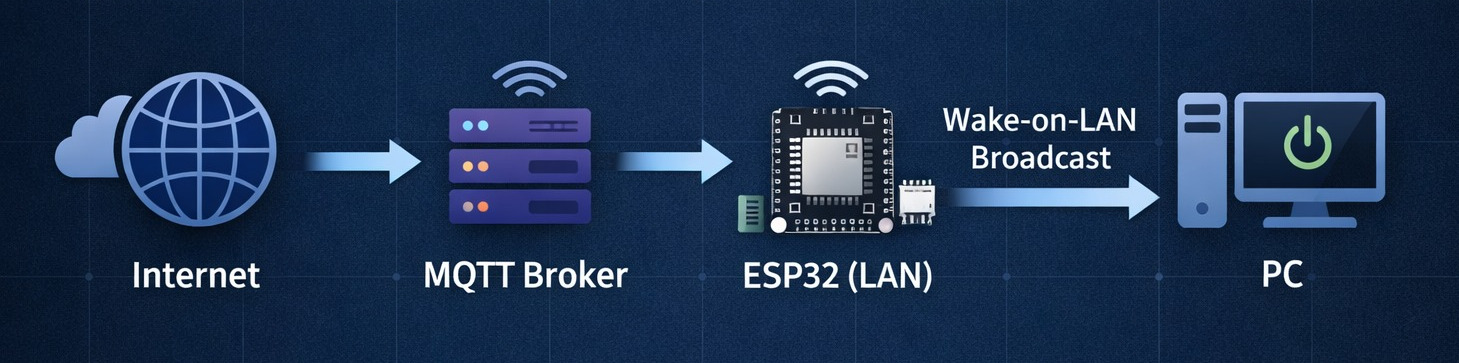
Works remotely even with CGNAT.
No port forwarding or public IP required. The ESP32 maintains an outbound connection and sends the Wake-on-LAN packet on your local network.
No port forwarding or public IP required. The ESP32 maintains an outbound connection and sends the Wake-on-LAN packet on your local network.
Important
• Wake-on-LAN must already work locally on your PC.
• Wake-on-LAN must be enabled in BIOS/UEFI and the operating system.
• Wake-on-LAN is most reliable over wired Ethernet.
• Wake-on-LAN must be enabled in BIOS/UEFI and the operating system.
• Wake-on-LAN is most reliable over wired Ethernet.